Expired Medical Device Inventory: Eliminate the Hidden Risk

Expired medical device inventory is one of the most persistent — and most underestimated — operational risks in the industry. Every rep trunk, hospital stockroom, consignment closet, and loaner set is a potential source of inventory expiration risk. And for most organizations, the systems in place to manage it are simply not up to the task.
This is not a people problem. It is a systems problem. And it has measurable consequences: financial write-offs that can reach tens of thousands of dollars per incident, FDA regulatory action, damaged hospital relationships, and — at its worst — patient safety events.
In this guide, we break down what causes expired medical device inventory, the true cost and regulatory stakes of expiration risk, how expiration tracking works in modern inventory management systems, and how Beacon gives operations teams the visibility and workflow automation to stay ahead of it.
What Causes Expired Medical Device Inventory?
Understanding why expiration risk persists requires looking at the structural conditions that allow it to grow unchecked. It is rarely one failure — it is the accumulation of several.
Distributed Field Inventory
Medical device inventory doesn't live in one place. A typical mid-size company's product is simultaneously spread across dozens of rep trunk stocks, hospital consignment closets, loaner and implant set kits, satellite facilities, and regional warehouses. Each location has a different owner, a different operational cadence, and a different level of oversight — and most have no automated expiration tracking in place.
Consignment Complexity
Consignment inventory is especially prone to expiration risk. Product placed in a hospital's storage room may sit untouched for weeks or months. Without item-level visibility, there is no way to know which lots are aging toward their expiration dates until someone physically checks — and by then, it may already be too late.
Rep Trunk Stock Blind Spots
Field reps often carry significant inventory value in their vehicles. That stock is difficult to audit centrally, and rep-reported expiration data is inconsistently captured. Expiring product in trunk stock is frequently discovered only when a rep prepares for a case — which is too late for planned removal and replenishment.
Reliance on Manual Spreadsheets and Periodic Audits
Most teams without dedicated medical device inventory management software still use manual methods: spreadsheets updated irregularly, rep-initiated lot checks, and periodic physical counts that capture only a snapshot in time. These processes cannot keep pace with the velocity and distribution of modern field inventory.
What Is Expired Inventory Tracking in Medical Device Inventory Management?
Expiration tracking in medical device inventory management is the systematic process of recording, monitoring, and acting on expiration date data at the item or lot level — across every inventory location in the field network.
It is distinct from simple inventory counting. A system can know how many units of a product are at a location without knowing when those units expire. Expiration tracking specifically captures and uses that temporal dimension of inventory data.
Lot-Level Tracking
Effective expiration tracking requires lot-level — and ideally unit-level — data. This aligns with FDA's Unique Device Identification (UDI) system, which encodes expiration data in the Production Identifier (PI) component of a device's UDI. Under 21 CFR Part 830 and the FDA UDI guidance, UDI-compliant labels must include expiration dates for devices where shelf life is relevant. Capturing this data at the point of receipt or scan enables all downstream tracking. Beacon, for example, treats the UDI as the source of truth, carrying it from device creation to the point of use. This allows the UDI to be the operational trigger for expired inventory tracking at all times.
Expiration Metadata in Inventory Systems
When expiration dates are captured as structured data in an inventory management system — not just printed on a box — they become queryable and actionable. Teams can filter all inventory by expiration window, generate reports, trigger workflows, and demonstrate compliance during audits.
Automated Expiration Alerts
The most important function of an expiration tracking system is proactive alerting. Rather than discovering expired inventory during a case or audit, configured alert windows (typically 30, 60, and 90 days pre-expiration) surface at-risk inventory while there is still time to act. This shifts expiration management from reactive cleanup to proactive process.
Proactive Removal and Closed-Loop Replenishment
Expiration tracking must connect to operational workflows to be effective. Identifying near-expiry inventory is only valuable if the system can also drive its removal — in bulk, across locations — and automatically trigger replenishment to prevent the under-stocking that typically follows a large expiration pull.
What This Enables: When expiration dates are live data in your inventory system — not static labels on physical product — your entire operation gains the ability to see, act, and report on expiration risk in real time.
The Real Cost of Expired Inventory: What the Data Shows
Expired inventory is not just a housekeeping issue. It carries direct write-off costs, indirect operational costs, and long-term relationship and regulatory costs that most organizations significantly undercount.
Beyond direct write-offs, the indirect costs are often greater and harder to see on a balance sheet. Emergency replenishment shipments, canceled or delayed cases, staff hours absorbed by reactive audits, and hospital confidence erosion all carry real financial weight that never appears on an expiry report.
- Studies show expired inventory can account for 9-10% of on-hand inventory (Sxanpro)
- Annual expired inventory costs can account for 6-13% of annual inventory spend at hospitals (Medtronic)
- Another study from Z5 Inventory estimates that as much as 30% of hospital inventory may expire before it can be used
- On average medical device companies hold up to 150 days of inventory, tying up working capital and exposing significant expiration risk
The AHRMM (Association for Health Care Resource & Materials Management) has documented that supply chain failures — including expired and non-conforming inventory — are a leading driver of supply chain-related OR disruptions. For surgical device companies, even a single case disruption can erode a hospital relationship that took years to build.
Regulatory Consequences of Poor Expiration Tracking in Medical Devices
Inventory expiration risk is not only an internal operational concern. It has direct implications under FDA regulation, hospital compliance standards, and — when things go wrong — mandatory reporting obligations.
FDA Quality System Requirements
Under the Quality Management System Regulation (QMSR) (21 CFR Part 820, now aligned with ISO 13485:2016), medical device companies must maintain controls over product shelf life and expiration. Distribution records are required to include lot or serial numbers and expiration dates where applicable. Corrective and Preventive Action (CAPA) systems must address recurring expiration failures.
FDA inspectors examining distribution and post-market surveillance operations routinely review expiration controls. Companies found with inadequate systems may receive Form 483 Inspectional Observations — and in more serious cases, Warning Letters or consent decrees.
UDI Expiration Linkage and Traceability
The FDA's UDI system creates a direct link between expiration tracking and traceability compliance. The UDI Production Identifier (PI) carries lot number, serial number, manufacturing date, and expiration date. Under 21 CFR Part 830 and the Global UDI Database (GUDID), this data must be captured and maintained across the supply chain. Inventory systems that scan and record UDI data — including expiration dates — satisfy both operational and regulatory traceability needs simultaneously.
Recall Implications
Expiration tracking intersects with recall readiness in an important way. A robust expiration tracking system that records lot numbers, locations, and movement history is also the foundation of an effective field recall response. Organizations with poor expiration tracking typically also struggle to execute lot-specific recalls quickly — a regulatory and safety risk in its own right.
MDR Obligations
If an expired medical device reaches a patient and contributes to an adverse event or malfunction, it may trigger mandatory Medical Device Reporting obligations under 21 CFR Part 803. This applies to both manufacturers and importers. The liability implications — for both the device company and the hospital — make expiration prevention a clinical and legal priority, not just an operational one.
Hospital and IDN Vendor Compliance
Hospital supply chain and compliance teams are increasingly conducting their own audits of vendor-managed and consignment inventory, often benchmarked against AdvaMed and MedTech Europe industry standards for device traceability. Expired product found during a hospital audit can result in the loss of consignment privileges, mandatory remediation plans, and formal vendor qualification consequences.
Regulatory Note: Under 21 CFR Part 803, if an expired medical device contributes to a patient adverse event, mandatory MDR filing may be required. This creates both regulatory and liability exposure for the device company — making expiration prevention a legal priority, not just an operational one.
A Typical Expiration Failure: How It Actually Unfolds
To understand the operational stakes, consider how a common expiration failure scenario actually plays out in the field.
A surgical rep arrives at a hospital for a routine orthopedic procedure. During case preparation, the scrub tech identifies an expired screw — lot number shows it expired six weeks ago. The procedure is delayed while the team confirms alternative inventory. A replacement is located, but it requires an emergency overnight shipment from a regional distribution center at significant cost.
The following week, the hospital's supply chain team conducts a quarterly consignment audit. They discover three additional expired items across two vendor-managed totes from the same rep. The hospital's compliance officer opens a vendor remediation file and places the rep's consignment access under review.
Back at the device company, the operations team now has to reconstruct where the expired inventory came from, when it was consigned, and whether any other accounts may have the same problems — using spreadsheets and manually collected rep reports. The process takes two weeks and many staff hours.
The total cost: one emergency shipment, two weeks of remediation labor, a damaged hospital relationship, and a compliance file that will affect the rep's next contract renewal negotiation.
This scenario is not an edge case. Variations of it happen regularly in organizations that manage expiration risk through manual processes.
Key Takeaway: Expiration failures create a compounding penalty: first the risk and cost of the expired product itself, then the downstream disruption, labor, and relationship damage that follows. Automated expiration tracking eliminates the root cause.
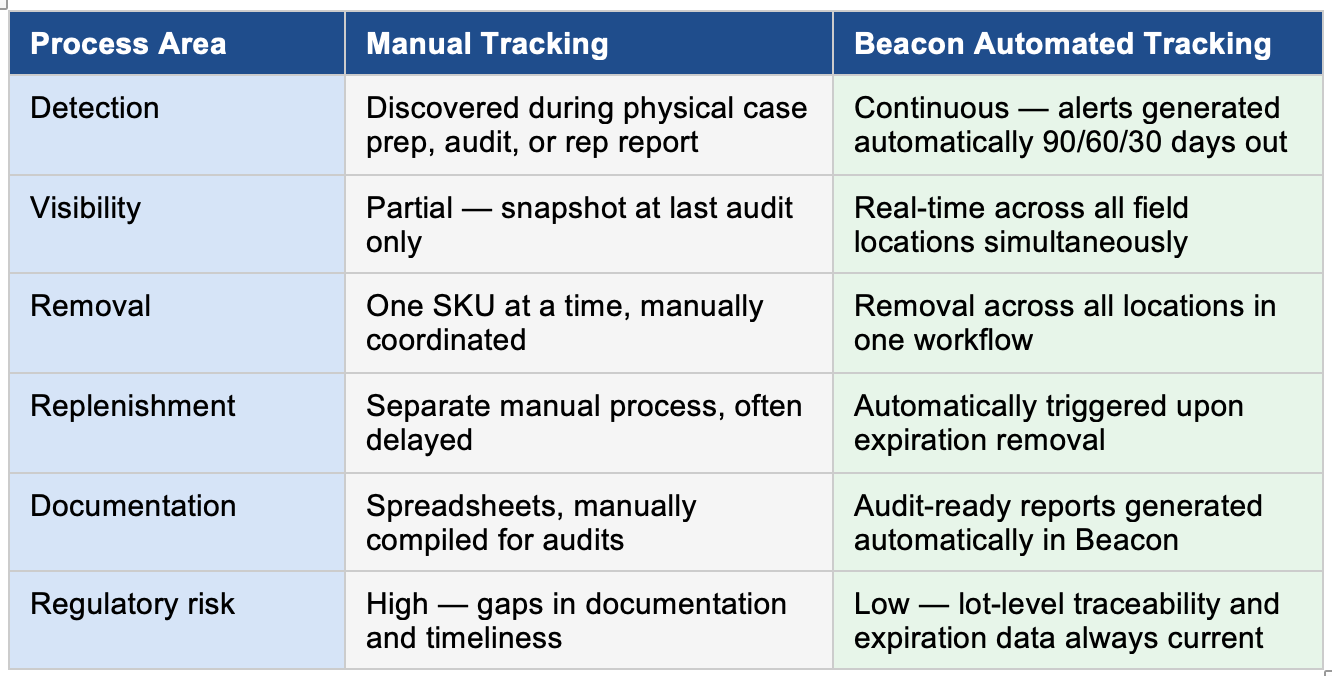
Expiration Tracking Workflow: Manual vs. Automated
The difference between manual and automated expiration tracking isn't just speed — it's the fundamental structure of how risk is detected and resolved.
Beacon Automated Expiration Tracking Workflow
How Beacon manages expiration risk from detection to replenishment:
1 - Scan & Capture
Inventory is scanned at receipt when the inventory is created in Beacon. UDI barcode captures lot number and expiration date as structured data in Beacon, the UDI becomes the source of truth.
2 - Continuous Monitoring
Beacon monitors expiration dates across all locations in real time. No manual re-check required. Reps may filter their inventory using date ranges to review expired inventory, or prioritize use of inventory expiring soon.
3 - Automated Alerts
At 90, 60, and 30 days pre-expiration, Beacon generates alerts for operations managers and relevant reps so inventory can be quarantined, returned, offered at a discount to utilize it, etc. Whatever your procedures for expiring inventory require.
4 - Return / Transfer
Expired or near-expiry product is transferred to manufacturer, quarantined, or returned — with full documentation.
5 - Inventory Removal Action
Operations team initiates removal of expired inventory across affected locations creating a record of inventory adjustment.
6 - Auto-Replenishment
Beacon automatically triggers replenishment orders to restore field stock levels when expired inventory is returned — closing the loop without manual follow-up.
Figure 1: Manual vs. Automated Expiration Management — Process Comparison
How Beacon Eliminates Expired Inventory Medical Device Risk
Beacon, ConnectSx's medical device inventory management software, is purpose-built for the operational realities of distributed field inventory — including the full complexity of managing expiration risk across consignment, loaner sets, and trunk stock at scale.
Real-Time Expiration Visibility Across All Locations
Beacon tracks expiration dates at the item level across every location type — trunk stock, consignment, loaner sets, and warehouse. Operations managers have a single dashboard view of all expired and near-expiry inventory across the entire field network, in real time. No spreadsheets. No waiting for rep reports.
Removal and Return Workflows
When near-expiry inventory is identified, Beacon enables removal across locations using quarantine and transfer workflows. Expired product can be transferred, returned to the manufacturer, or quarantined — with full lot-level documentation for regulatory compliance.
Closed-Loop Replenishment
Removing expired inventory without replacing it creates a secondary problem: understocked field reps who cannot support cases. Beacon closes this loop by automatically triggering replenishment requests when expired inventory is transferred, ensuring stock levels are restored without manual follow-up or emergency shipping.
UDI-Compatible Scanning
Beacon's scanning workflow captures UDI barcode data — including the expiration date encoded in the Production Identifier — at the point of receipt. This satisfies FDA traceability requirements and populates expiration tracking data automatically, eliminating manual data entry.
Audit-Ready Expiration Reporting
For FDA inspections and hospital compliance audits, Beacon generates inventory reports for expiration tracking documenting lot numbers, expiration dates, and location history. When documentation of expiration controls is requested, the data is already organized and immediately accessible.
Beacon Platform: Beacon is the intelligent operating system for medical device logistics. Real-time inventory data. Automated expiration tracking. Audit-ready compliance reporting. The right medical device inventory management software is not a cost center — it is a revenue driver.
What Changes When Expiration Tracking Becomes Systematic
The downstream effects of building expiration tracking into your operational infrastructure compound over time.
- Reps operate with confidence that every item in the field is valid and usable — no case-prep surprises
- Hospital accounts see consistent, reliable vendor performance, reducing compliance audit exposure
- Operations teams stop absorbing hours in reactive cleanup cycles and redirect that capacity
- Financial write-offs shrink as near-expiry inventory is caught and acted on before the expiration date
- Regulatory documentation is current and accessible — not reconstructed under audit pressure
- Recall readiness improves automatically, since the same lot-level data that supports expiration tracking also supports field recall execution
Medical device inventory management stops being a recurring operational liability and becomes a process that runs reliably in the background — freeing time and attention for higher-value work.
The Higher Standard Modern Medical Device Operations Require
Expired medical device inventory will always exist. The question is whether it is managed proactively — caught and resolved before it reaches a case, an audit, or a patient — or reactively, after the damage is already done.
The organizations that scale successfully will be the ones who build systems that surface expiration risk early, act on it in bulk, and close the loop between removal and replenishment automatically. That requires purpose-built medical device inventory management software — not spreadsheets, not periodic audits, and not hope.
Treating inventory expiration risk as a systems problem rather than a people problem is how modern device operations protect patients, protect hospital relationships, and protect their bottom line
FAQ: How to Track Medical Device Expiration Dates
Q: How do I track medical device expiration dates across field inventory?
A: The most effective approach is item-level expiration tracking within a purpose-built medical device inventory management platform. Each unit or lot has its expiration date recorded as structured data in the system, linked to its physical location — whether trunk stock, consignment, loaner set, or warehouse. Platforms like Beacon surface expiration dates in real time across all locations, eliminating the need for manual spreadsheet tracking or periodic physical audits.
Q: What are the FDA requirements for expiration date tracking in medical device distribution?
A: Under 21 CFR Part 820 and the updated QMSR (aligned with ISO 13485:2016), medical device companies must maintain distribution records that include lot or serial numbers and expiration dates where applicable. The FDA's UDI system further requires expiration date data to be encoded in the UDI Production Identifier (PI) for applicable devices. Expiration date controls are a common focus of FDA inspections, and Form 483 observations have been issued to companies with inadequate tracking systems.
Q: How do hospitals track expiration dates for medical devices?
A: Hospital supply chain teams typically rely on a combination of their own ERP or materials management systems, periodic physical audits of vendor-managed and consignment inventory, and vendor-provided documentation. Increasingly, hospitals are requiring device suppliers to demonstrate active expiration tracking and provide lot-level expiration reports as part of consignment vendor qualification. Suppliers who cannot provide this documentation face growing risk of losing consignment access.
Q: What happens to expired consignment inventory?
A: Expired consignment inventory should be immediately quarantined and removed from usable stock. Depending on manufacturer return policies, it may be returned for credit, destroyed, or reclassified as a write-off. Beacon enables bulk quarantine and return workflows so expired consignment inventory is handled systematically — not case by case — with full lot-level documentation for both the device company and the hospital's records.
Q: Can expired medical devices be returned to manufacturers?
A: Return policies vary by manufacturer, product category, and contract terms. Many manufacturers accept returns of near-expiry (but not yet expired) inventory within a defined window — often 60–90 days pre-expiration. Once a device is past its expiration date, return credit is typically not available. This is why proactive expiration tracking with advance alerting is operationally critical: acting at 90 days out preserves return options that are not available at 30 days.
Q: How often should medical device expiration audits occur?
A: For organizations using manual tracking, quarterly physical audits are a common minimum — though they are rarely sufficient to catch all expiring inventory given field distribution complexity. For organizations using automated expiration tracking software, audit frequency becomes less critical because the system monitors expiration dates continuously. That said, periodic physical verification audits (at least semi-annually) remain good practice for confirming data accuracy and regulatory compliance.
Q: What software tracks medical device expiration dates?
A: Purpose-built medical device inventory management platforms like ConnectSx's Beacon are designed specifically for field inventory expiration tracking — including lot-level date capture, automated alert configuration, removal workflows, and audit-ready reporting. Generic ERP systems and spreadsheets can store expiration date data but typically lack the field inventory workflows, mobile scanning, and real-time visibility needed to manage distributed medical device inventory effectively.
Q: What is the financial cost of expired medical device inventory?
A: Direct costs vary across industry sectors and manufacturers, but estimates have reached as high as 30% of annual inventory spend at hospitals. Indirect costs — emergency replenishment shipping, case disruptions, audit labor, and loss of hospital confidence — frequently exceed the direct write-off value.
Q: How does UDI relate to expiration tracking for medical devices?
A: The FDA's Unique Device Identification (UDI) system is directly linked to expiration tracking. The UDI Production Identifier (PI) component encodes lot number, serial number, and expiration date for applicable devices. Inventory systems that scan and record UDI data automatically capture expiration dates at the point of receipt, satisfying both FDA traceability requirements and operational expiration tracking needs simultaneously. This makes UDI-compatible scanning a foundational capability for any medical device expiration tracking system.
Q: What happens if an expired medical device is used in a procedure?
A: If an expired medical device contributes to an adverse event or patient injury, it may trigger mandatory Medical Device Reporting (MDR) obligations under 21 CFR Part 803. This creates regulatory and liability exposure for both the hospital and the device company. Beyond MDR, the hospital may face Joint Commission scrutiny, and the device company may face FDA inspection follow-up. Preventing expired inventory from reaching the point of use is both a patient safety imperative and a legal risk management priority
Conclusion
Most organizations don’t have a single, reliable view of expired inventory across all locations. They don’t know what’s expired, where it’s stored, how much exists, or what needs to be replaced. Without that visibility, expired inventory management becomes reactive instead of preventative.
Teams are constantly cleaning up messes instead of preventing them.
From manual cleanup to automated workflow
Expiry management doesn’t have to be a recurring fire drill. When this data is tracked at the item level and connected to inventory workflows, expiring inventory can be managed proactively instead of manually.
Modern systems make it possible to:
- instantly identify all expired inventory across locations
- remove it from the field in bulk
- return or transfer it back to the manufacturer in one action
- and automatically trigger replenishment to restore stock levels
That final step is what closes the loop. Removing expired inventory without replacing it simply creates a new problem. Automation ensures expired inventory is removed and replenished in the same workflow, keeping inventory healthy without extra labor or follow-up.
What changes when expired inventory is automated
When expiration management becomes a systematic process instead of a manual process, everything downstream improves. Teams spend less time auditing and chasing down items. Data becomes cleaner. Reps gain confidence that what’s in the field is valid and usable. Hospitals see more consistency. And operations teams stop losing hours to repetitive cleanup work.
Inventory stops being a recurring headache and becomes just another routine process that runs quietly in the background.
A better standard for the industry
Expired inventory will always exist — but chaos doesn’t have to.
As medical device operations grow more complex, the teams that scale successfully will be the ones who eliminate manual risk wherever possible. Expired inventory is one of the clearest opportunities to do that.
When expired inventory is treated as a system problem instead of a people problem, organizations protect patients, protect relationships, and protect their time.
And that’s the real win: less risk, less labor, and more confidence in the field.
See Your Field Expiration Exposure in Under 10 Minutes
Schedule a 15-minute expiration risk assessment and find out exactly where your field inventory stands.
connectsx.com • Request Free Trial • Schedule a Demo
Beacon is the intelligent operating system for medical device logistics. Streamline workflows, accelerate support, turbo-charge operations. Simplify repetitive tasks, cut overhead, eliminate manual error. Access real-time data to report, visualize, strategize, and act. The right software for medical inventory management is not a cost center, it is a revenue driver.
Brendan Sweeney
ConnectSx Team
Ready to streamline your operations?
See how Beacon can transform your medical device workflows.