Mobile Inventory Management for Medical Device Teams: How to Choose the Right Field Inventory App
Mobile Inventory Management for Medical Device Teams: How to Choose the Right Field Inventory App
What Is Mobile Inventory Management for Medical Device Teams?
Mobile inventory management for medical device teams refers to using a dedicated mobile inventory app to track, manage, and transact device inventory in real time—directly from a smartphone or tablet in the field. Rather than relying on a desktop system back at the office, a field inventory app lets reps, distributors, warehouse staff, and admins act on inventory wherever they are.
This matters more in medtech than in almost any other industry. Medical device inventory isn't sitting neatly in a single warehouse—it's spread across trunk stock, hospital consignment shelves, regional stockrooms, and surgical trays. And it needs to move, get tracked, get billed, and stay compliant in real time.
This is where things break. A rep standing in an OR hallway shouldn't have to call the warehouse to confirm lot availability. A warehouse associate receiving a pallet shouldn't have to manually key barcodes into a desktop later that evening. A distributor shouldn't lose billing revenue because the paperwork piled up until Friday.
A purpose-built mobile inventory app for medtech fixes all of that—by putting real-time transaction capability in the right hands at the right moment.
Mobile Inventory App vs. Desktop Inventory Systems: What's the Difference?
Many medical device operations already have some form of inventory software—often a module inside an ERP, a spreadsheet system, or a legacy desktop tool. So why does mobile matter on top of that?
Here's how a purpose-built mobile inventory app for medical device compares to traditional alternatives:
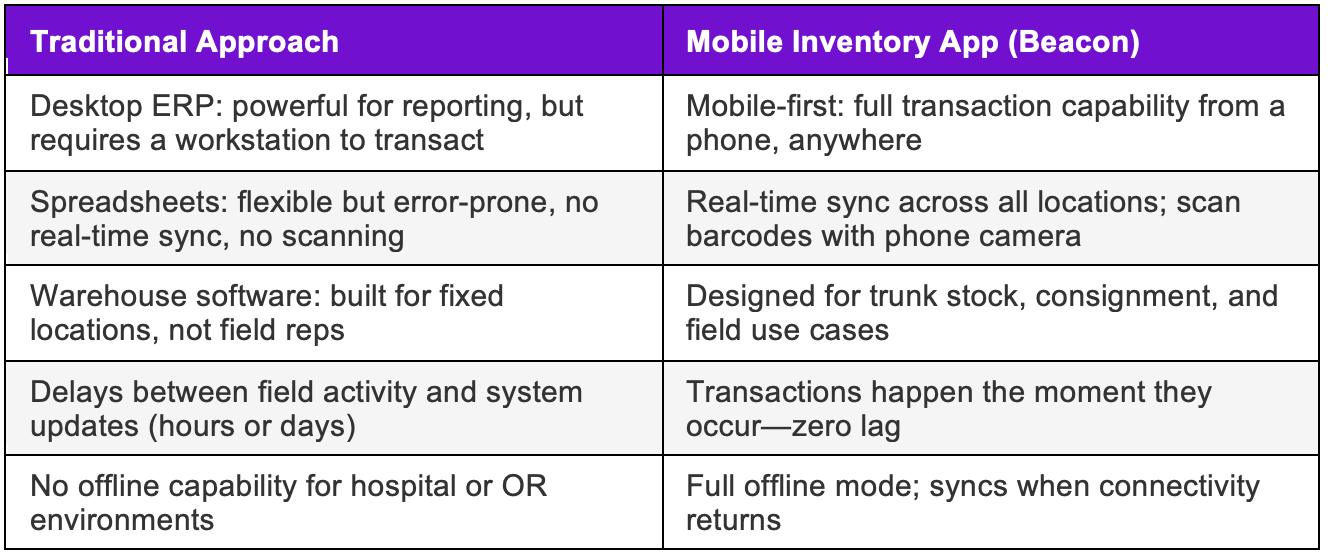
The bottom line: a field inventory app for medical devices isn't a replacement for your ERP or web console—it's the missing link that makes those systems accurate, because it captures field activity in real time instead of after the fact.
Why Mobile Inventory Management Apps Are Essential for Medical Device Teams
Medical device inventory is uniquely complex. Products carry lot numbers, serial numbers, expiration dates, and UDI requirements. They cross multiple business entities, move on short notice, and must be billed accurately at the point of care.
When your inventory software only lives on a desktop, there's always a gap between when something happens in the field and when it gets recorded. That gap is expensive:
- Missed or incorrect billing from manual catch-up
- Compliance exposure from expired or untracked product
- Stockouts at case time from inaccurate counts
- Hours of weekly reconciliation no rep wants to do
Teams using mobile inventory apps typically reduce weekly reconciliation time by 70%+ and accelerate billing cycles by 2–3 days. That's not a software upgrade—that's a fundamental shift in how field operations run.
The key is real time. Acting on your phone the moment something happens—not waiting to get back to a computer to make transactions—is what separates efficient medtech operations from costly, error-prone ones.
Who Benefits From a Mobile Inventory App in Medical Device?
Sales Reps and Independent Distributors (Primary Users)
This is where a mobile inventory app for medical sales reps delivers the most direct ROI. A rep's day is spent in motion—moving between accounts, hospitals, and storage locations. This is where reps lose time: chasing down lot numbers, reconciling billing at night, calling the warehouse to confirm stock before a case.
A great field inventory app eliminates all of that:
- Check real-time stock levels across trunk, consignment shelves, and warehouse before driving to a case
- Scan device barcodes with your phone camera to instantly confirm lot, serial, and expiration details
- Create cases, manage billing, and capture digital signatures at the point of care
- Initiate inventory transfers between locations without a single phone call or email
- Receive expiration alerts before opening a product in a sterile field
For a rep on commission or a distributor running a territory, these aren't nice-to-haves. They're the difference between a smooth week and a week spent correcting paperwork at 10 PM.
Warehouse Teams and Admins
While sales reps are the primary audience for a mobile inventory app in medtech, warehouse staff and manufacturer admins get serious value too—especially for on-the-go referencing and real-time transactions without waiting for a workstation:
- Scan incoming product barcodes to receive shipments from the floor
- Verify lot numbers and expiration dates by scanning directly from the shelf
- Confirm transfer acceptance while walking the warehouse
- Pull up device history or usage records during a spot audit
- Reference inventory levels during supplier calls or planning discussions
The key is immediacy. Transactions happen in real time, from wherever the work is happening—not hours later when someone finally sits down at a workstation. That immediacy keeps inventory records clean all day.
Mobile Inventory Management in Action: Three Real-World Scenarios
Scenario 1: The OR Suite
It's 6:45 AM. A surgeon adds a case to the schedule—hip revision instrumentation. The rep gets a push notification. From the parking lot, they open Beacon, confirm they have the right implants in trunk stock (scanning the tray barcode to verify lot and expiration), and log the case. After the procedure, they use scan-to-bill to add every item used to the bill sheet. The hospital rep signs off digitally. Billing goes to the distributor instantly. The entire workflow—confirmation, documentation, billing—happened from a smartphone. No desktop required.
Scenario 2: The Field Rep Between Accounts
A territory rep is driving between two hospital accounts when a colleague calls: they're short on a specific implant size for an afternoon case. The rep opens their mobile inventory app, scans trunk stock to confirm they have the item, and initiates a transfer from their phone. The receiving rep gets a notification, accepts it in the app, and drives to pick it up. No warehouse call, no spreadsheet update, no guessing. Two reps, one real-time transaction.
Scenario 3: Warehouse Receiving
A shipment arrives at a regional warehouse. The associate uses Beacon on their Android device to scan each item's UDI barcode off the pallet. Lot numbers, serial numbers, and expiration dates are captured automatically. Inventory levels update in real time. The manufacturer admin at headquarters sees updated counts immediately in the Beacon web console—no manual entry, no end-of-day data dump.
Beacon: A Field Inventory App Built Specifically for Medical Device
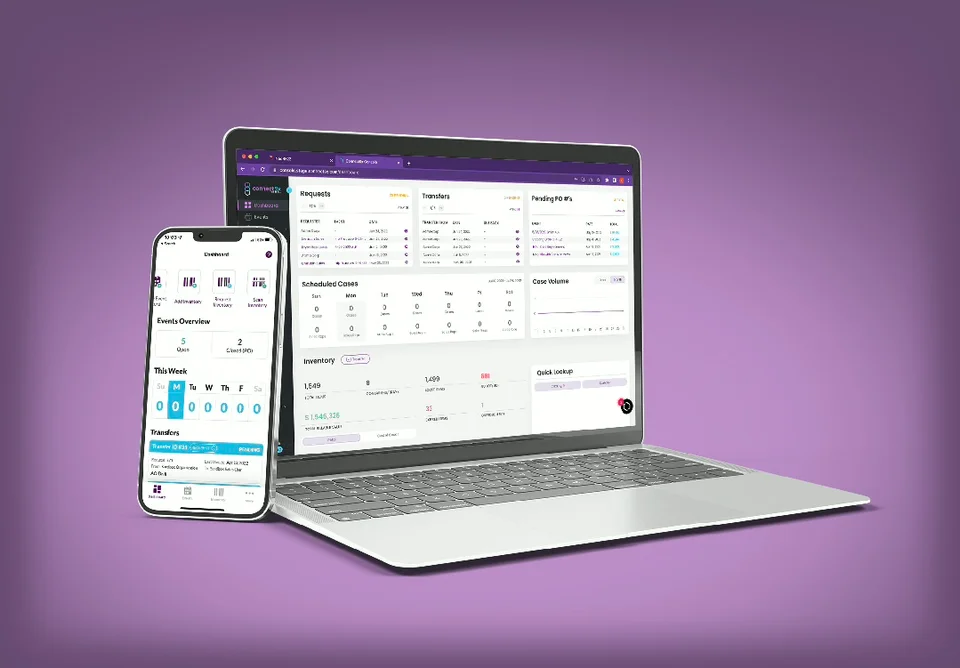
Beacon by ConnectSx is a purpose-built mobile inventory management platform for medtech—not a generic inventory app with a mobile view bolted on. Here's what the field experience looks like:
Real-Time Inventory Visibility
- View stock levels across trunk, consignment, and warehouse from one screen
- Filter by product, lot number, serial number, or expiration date
- See what's assigned to upcoming cases and what's available to commit
- Offline mode keeps data accessible in low-connectivity hospital environments—auto-syncs when reconnected
Barcode Scanning With Your Phone Camera
Beacon turns any smartphone into a handheld scanner. Scan a device's barcode or UDI directly from the app—no dedicated hardware needed. Use it to:
- Confirm device identity before case use
- Receive incoming shipments by scanning each item
- Add items to a bill sheet at the point of care
- Verify expiration dates before opening sterile packaging
Case and Billing Management
- Create and update cases from your phone—no waiting for a desktop login
- Scan-to-add billing: pull items into a case by scanning barcodes or package labels
- Auto-generate bill sheets and send by email directly from the app
- Capture digital signatures and store e-documents at the point of sale
- AI-assisted tools to reduce manual entry and flag billing discrepancies
Inventory Transfers and Team Collaboration
- Initiate transfers between reps, distributors, and warehouses in real time
- Push notifications when stock arrives or a transfer needs acceptance
- Role-based permissions protect pricing and patient data
- All field actions sync automatically with the Beacon web console
The Real Value of a Streamlined Mobile Inventory and Sales Management App for MedTech Reps
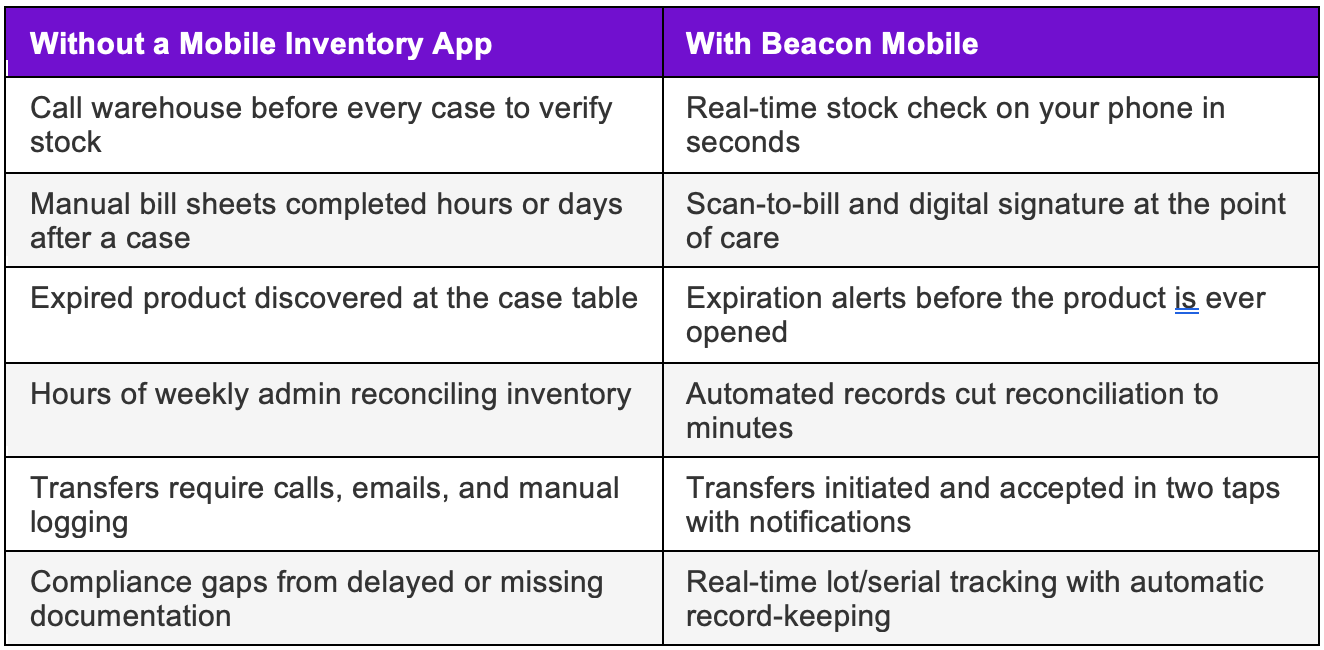
For medtech sales reps and distributors, a user-friendly inventory app for medical sales reps isn't about checking a technology box. It directly affects revenue, relationships, and the hours in your week.
70%+ reduction in weekly reconciliation time
Teams using real-time mobile inventory management spend dramatically less time on manual catch-up admin work.
2–3 day acceleration in billing cycles
Scan-to-bill at the point of care means invoices go out the same day—not when the rep finally gets to a desk.
Live in under a day
Beacon's intuitive design means most teams are fully operational on the mobile inventory app within 24 hours of starting their free trial.
What to Look For in a Mobile Inventory App for Medical Device
Not every inventory app is built for medical devices. Here's what separates a purpose-built field inventory app from a general-purpose tool—use this as your evaluation checklist:
- Medical-grade tracking: Lot numbers, serial numbers, expiration dates, and UDI barcodes must be core features—not workarounds
- Barcode scanning via phone camera: No dedicated hardware should be required for receiving, billing, or verification workflows
- Offline functionality: Hospital and OR environments have limited connectivity; your app must work without Wi-Fi
- Multi-location visibility: Trunk stock, consignment, and warehouse should be visible in one view—not separate logins
- Real-time sync with a web console: Field transactions must immediately update the back office for reporting and compliance
- Role-based permissions: Protect pricing, patient data, and business logic from unauthorized access
- Integrated billing and case management: Sales management and inventory management should be a single workflow, not two separate tools
- Ease of use: If the app requires extensive training, adoption suffers. The best mobile inventory apps feel intuitive from day one
Why Generic Inventory Apps Fail in Medical Device
This is where a lot of medtech teams waste time and money: they try to adapt a general warehouse app or a retail inventory tool to their operation. Here's where things break:
- No UDI support: Generic apps don't know what a UDI barcode is. You can't build regulatory compliance on top of a system that wasn't designed for it.
- No consignment logic: Consignment inventory—product on hospital shelves that you still own—requires specific tracking rules that warehouse apps simply don't have.
- No case workflow: Creating a surgical case, assigning devices to it, capturing usage, and generating a bill sheet is a unique medtech workflow. Generic apps can't replicate it.
- No lot/serial tracking at the transaction level: If you can't track exactly which lot number was used in which procedure, you have a recall problem waiting to happen.
- No multi-entity support: Medical device distribution involves manufacturers, distributors, and reps—all with different data visibility needs. Generic apps treat everything as a flat inventory list.
- No offline mode: A mobile inventory app that doesn't work in a hospital basement is not a field inventory app—it's a liability.
Beacon was built from the ground up to solve exactly these problems. It's not a generic inventory app with a medical device template applied—it's a medtech-native platform that handles the complexity as a baseline.
What If You're Not Ready for a Mobile Inventory App Yet?
Fair question—not every team is at the same stage. If you're still running on spreadsheets or a basic system, here are some manual process improvements that can buy you time:
- Standardize lot and serial tracking templates so at least the data is consistent
- Establish a daily end-of-day reconciliation habit so the gap between field and system is 24 hours, not a week
- Use shared folders or cloud docs to centralize bill sheets before submitting
- Create a physical intake checklist for warehouse receiving to reduce missed items
These improve things. But here are the warning signs that you've outgrown them:
- You've had a billing dispute or a case delay caused by inventory confusion in the last 90 days
- A rep is spending more than 3 hours per week on admin and catch-up
- You've had an expired product make it into a case tray
- You can't answer 'where is this lot number right now?' in under 2 minutes
- Your month-end reconciliation takes more than a day
When those limits become clear—and they will—here's what to look for in a mobile inventory management app for medical device: everything covered in this article. At that point, the ROI of switching is immediate.
FAQ: Mobile Inventory Management for Medical Device
What is a field inventory app for medical devices?
A field inventory app for medical devices is a mobile application that lets reps, distributors, and warehouse teams track, transact, and manage device inventory in real time from a smartphone or tablet. Unlike desktop systems, field inventory apps work in hospitals, ORs, and warehouses without requiring a workstation.
Why should a medical device operation include a mobile component in their inventory management?
Medical device inventory is inherently field-based—product lives in trunks, consignment shelves, and ORs, not just warehouses. When software only lives on a desktop, there's always a lag between field activity and system records. That lag creates billing errors, compliance risk, and operational confusion. Mobile closes the gap by enabling real-time transactions wherever the product actually is.
How do sales reps track inventory in the field?
With a mobile inventory app like Beacon, reps scan device barcodes with their phone camera to confirm lot, serial, and expiration details; check stock across all their locations in real time; create cases and bill sheets on the fly; and initiate transfers between reps or warehouses—all without needing to return to a desktop or call the warehouse.
What features should a mobile inventory app for medical device have?
Look for: lot/serial/UDI tracking, phone camera barcode scanning, offline mode for hospital environments, multi-location inventory visibility, integrated case and billing management, role-based permissions, real-time sync with a web console, and ease of use that doesn't require days of training.
Can mobile inventory apps replace spreadsheets in medtech?
Yes—and they should. Spreadsheets are manual, error-prone, and have zero real-time capability. A purpose-built mobile inventory app captures data at the moment of transaction, eliminates manual entry, and keeps every stakeholder synchronized. Teams that switch typically cut reconciliation time by 70%+ within the first month.
Is a mobile inventory app only for sales reps?
No. While sales reps and distributors get the most direct revenue impact, warehouse staff benefit from mobile scanning for receiving and cycle counts, and manufacturer admins benefit from on-the-go visibility and the ability to act on transactions without a workstation. Anyone who touches inventory should be able to interact with the system from wherever they are.
Can I scan UDI and device barcodes with a regular smartphone?
Yes. Beacon uses your phone's built-in camera to scan standard barcodes, QR codes, and UDI barcodes. No dedicated scanning hardware is required—this works for receiving, case management, expiration verification, and billing workflows.
What happens if I lose connectivity in the OR or hospital?
Beacon's offline mode keeps your data accessible and lets you record transactions even without an internet connection. Everything syncs automatically once the device reconnects to Wi-Fi or cellular.
How quickly can a team get up and running with Beacon?
Most teams are fully operational within a day. Beacon is designed to feel intuitive from the start—basic workflows like scanning inventory, creating a case, or initiating a transfer take minutes to learn. ConnectSx provides onboarding support and a full knowledge base.
Is Beacon available on both iOS and Android?
Yes. Beacon is available on both the Apple App Store and Google Play. The full web console is accessible via any browser for admins and back-office teams.
Put Beacon in Your Pocket
The operating room waits for no one. Whether you’re a manufacturer administrator, a warehouse manager, or—especially—a sales rep or distributor in the field, Beacon Mobile empowers true mobile inventory management, letting you command your inventory and your business from anywhere.
👉 See Beacon Mobile in action—request a live demo or start a free trial today, and discover how much more you can achieve when the full power of ConnectSX fits in your pocket.
Brendan Sweeney
ConnectSx Team
Ready to streamline your operations?
See how Beacon can transform your medical device workflows.